Access policies
Control which subjects receive routes to private services.
Access policy is default-deny and is separate from gateway Firewall rules.
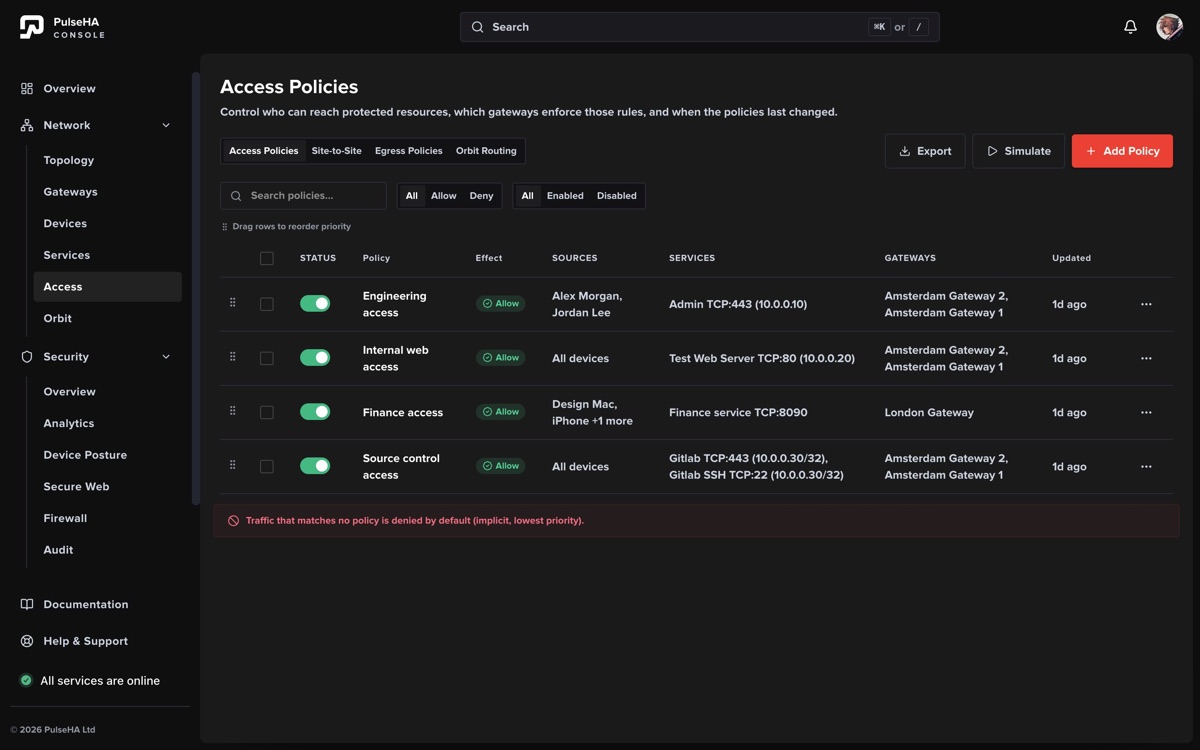
The list exposes the fields that determine policy evaluation and provides simulation and history actions.
Create or edit policy#
- Choose Allow or Deny and set priority. Lower numbers evaluate earlier.
- Deliberately choose All subjects or Selected. A Selected scope with no subjects matches nobody.
- Select at least one service.
- Deliberately choose All tenant gateways or Selected. A Selected gateway scope cannot be empty.
- Review overlap warnings, then save.
Time schedule and source-IP conditions may be visible on retained policies, but they are unavailable in this release. They cannot be presented or saved as enforceable restrictions.
Each successful save publishes a revision. Concurrent edits can produce a revision conflict; reload, compare the newer policy, and reapply the intended change. Use row ordering, numeric priority, simulation, and View history to understand policy evolution. History retains prior identity and revisions without making deleted policy active again.
Use Policy simulation before widening a grant.