Platform concepts
Understand the objects that make a PulseHA connection.
A PulseHA deployment is a small set of objects that reference each other. A tenant owns everything. Users own devices. Devices run the agent. Gateways sit beside private applications and terminate tunnels. Services name a destination behind a gateway. Access policies connect subjects to services. Device policies and posture policies shape the agent. Exit nodes and Orbit carry internet traffic. This page defines each object, says where you manage it, and shows how they depend on one another.
The objects at a glance#
| Object | Console page | Depends on |
|---|---|---|
| Tenant | Settings → General | nothing |
| User | Settings → Users | tenant |
| Group | selected as a subject in Network → Access (no dedicated page) | tenant, users |
| Device | Network → Devices | tenant, user |
| Gateway | Network → Gateways | tenant |
| Service | Network → Services | gateways |
| Access policy | Network → Access → Access Policies | services, subjects, gateways |
| Device policy | Network → Devices → Device Policies | tenant, role, group or device |
| Posture policy | Security → Device Posture | tenant, role, group or device |
| Exit node | Network → Gateways (edit) and Network → Access → Egress Policies | a gateway with Exit Node enabled |
| Orbit | Network → Orbit | tenant opt-in per region |
| LAN network | gateway drawer, Networks tab | gateway |
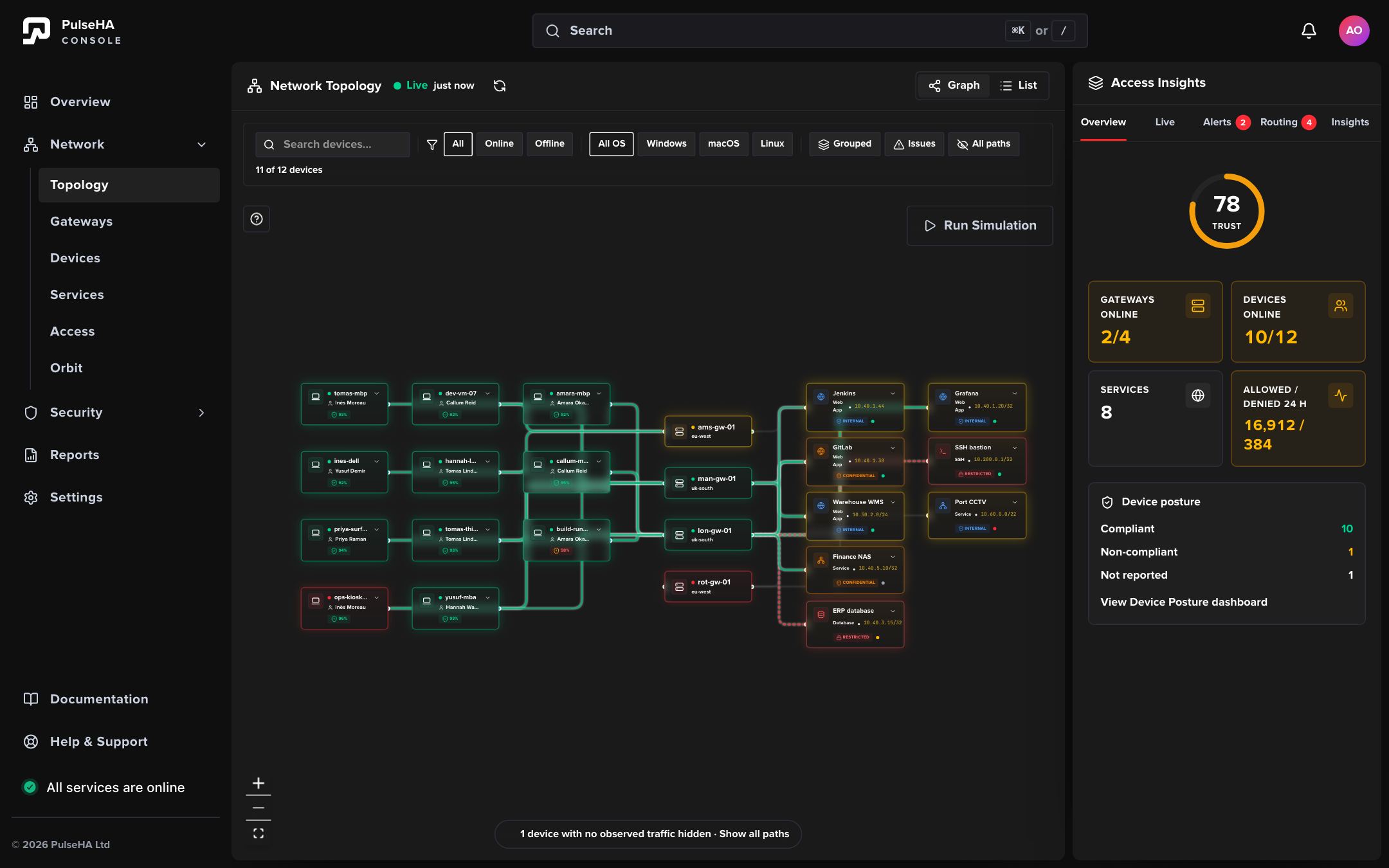
Network → Topology draws these objects and their links: devices reach services through gateways, along the paths that access policies allow.
Tenant#
The tenant is your organization. Every other object carries its tenant ID, and control checks that ID on every read and write. A tenant has a status (active, trial, suspended or churned); a suspended tenant’s devices are refused when they try to authorize. Any change that affects what agents or gateways should do publishes new configuration, and both fetch it on their next check-in.
User and group#
A user is a person who signs in to the console or approves a device. Users hold a role, and roles carry permissions that gate both menu items and API calls. Groups are tenant-scoped collections of users. An access policy can target a group instead of listing users one by one. The console offers groups as policy subjects but has no page for editing membership.
Device#
A device is an endpoint running the agent. It is created when a user completes the browser device flow: the agent prints a code, the user signs in and approves it at console.pulseha.com/device, and control records the device against that user. A user may hold at most 5 devices.
A device has:
- a WireGuard public key, generated on the device at login;
- a tunnel IP, assigned by control;
- a lifecycle status: active, inactive (no heartbeat for 5 minutes), archived (inactive for 90 days), or revoked;
- a connection state derived from heartbeats (the console shows Online when seen within 4 minutes);
- a posture snapshot with per-check results and a trust score.
Revocation is permanent. The device is removed from every gateway’s peer list on the next publish and must enroll again.
Gateway#
A gateway is a Linux host you run beside your applications. It enrolls with a single-use code, receives an mTLS certificate, and from then on fetches configuration from control with that certificate. A gateway terminates WireGuard tunnels from devices, enforces access rules in nftables, forwards allowed traffic to the application with source NAT, and runs a DNS resolver for the devices connected to it.
A gateway has a status (pending until first heartbeat, then online or offline; the console also derives degraded and unknown), a reported version, a tunnel address, and two exit flags: capable and enabled. Control stops serving configuration to a gateway below the platform minimum version.
Service#
A service names one destination that a gateway can reach. It has an address type (IP / CIDR or Gateway Host), an address, a protocol (TCP or UDP), ports and an optional application type (Web, API, Database, SSH, RDP or Custom). Ports are a list or ranges such as 22, 80, 443 or 8000-8100, at most 32 entries; empty means every port of the protocol. Gateway Host publishes one TCP port on the gateway itself. Hostname destinations are not supported, and older services that still use a DNS name are not enforced. A service lists the gateways that can serve it; an empty list means all gateways. It can carry an optional health probe (HTTP, TCP or UDP) and an optional DNS name.
A service grants nothing on its own. It is the object an access policy points at.
Access policy#
An access policy says which subjects may reach which services through which gateways. It has:
- an effect, Allow or Deny;
- a priority; lower numbers evaluate first, and on a tie Deny wins;
- a subject scope, All subjects or a selected set of users, groups and devices;
- one or more services (a policy with no services is skipped);
- a gateway scope, All tenant gateways or a selected set.
Control compiles policies into one route per device and service, hands the device the resulting allowed IPs, and hands each gateway a per-device nftables rule. A device with no matching Allow receives no route, and the gateway’s forward chain drops anything without a rule. Time and source-IP conditions are visible on older policies but are not supported; a policy that carries one is refused at publish.
Device policy and posture policy#
These two are often confused. A device policy configures agent behaviour: auto-connect, launch on startup, kill switch, disable disconnect, tamper protection, trusted networks, DNS servers, minimum agent version and log level. Each setting is Enforce On, Enforce Off or User Choice. Policies cascade device, then group, then role, then tenant.
A posture policy evaluates device health. The agent runs five checks: disk encryption, firewall, OS version, screen lock and antivirus. The policy sets a mode (monitor, warn or enforce), required checks, a minimum trust score and an enforcement action. Only enforce mode with a blocking action removes access, and it does so by stripping the device’s routes at publish time and sending a disconnect command.
Exit node and Orbit#
An exit node is one of your gateways with Enable Exit Node switched on. An egress policy then decides, per tenant, role, group or device, whether internet traffic must, may or must not use an exit, and which gateways or regions qualify. The agent routes 0.0.0.0/0 through the chosen gateway and the gateway applies source NAT.
Orbit is PulseHA’s public egress network. You opt in per region under Network → Orbit → Settings. The agent then brings up a second tunnel to an Orbit point of presence with short-lived credentials issued by control. Orbit routing rules steer subjects toward a region; they never grant private access. Orbit PoPs also run the TURN relays used for NAT traversal.
How the pieces fit#
- A user approves a device. Control stores its public key and tunnel IP.
- You enroll a gateway. It gets a certificate and a tunnel address.
- You publish a service and assign the gateway.
- You create an Allow policy for a group and the service.
- Control publishes new configuration. The device receives the service CIDR as an allowed IP on that gateway; the gateway receives a rule allowing the device’s tunnel IP to the service address and port.
- The device handshakes with the gateway, traffic flows, and the gateway’s resolver answers the service’s DNS name.
Every layer must allow. A firewall Deny, a posture block or a missing policy each refuses the flow on its own.