WireGuard data plane
Understand how PulseHA distributes encrypted tunnel configuration.
PulseHA moves traffic between agents and gateways over WireGuard. The control plane never carries your application traffic. It decides who may talk to what, then hands each side the peer list, keys and allowed routes it needs. This article explains what runs where, how a tunnel comes up, how the agent reaches a gateway behind NAT, and what the tunnel does and does not protect.
Two WireGuard implementations#
| Side | Implementation | Interface | Configured by |
|---|---|---|---|
| Agent (Linux, Windows, macOS) | Embedded wireguard-go running inside the agent process on a TUN device | pha0 by default | the agent, from its control-plane config |
| Gateway (Linux) | Kernel WireGuard, driven through wgctrl | wg0 by default, UDP port 51820 | the gateway, from its control-plane config |
The agent does not need a kernel module or a system wg binary. The gateway does: its preflight requires wg, nft and ip on the host, and net.ipv4.ip_forward set to 1.
The agent sets a conservative interface MTU: 1380 on Linux and 1280 on Windows. This keeps encrypted packets deliverable on paths below 1500 bytes.
Keys#
Each agent generates its own WireGuard private key at login. The key never leaves the device. It is stored in the agent’s state file under the account directory, with directory mode 0700 and file mode 0600. On Linux and macOS the state file is encrypted with AES-256-GCM using a random key file in the state directory. On Windows it is protected with DPAPI in machine scope. The public key is sent to control at registration and shown in the console (Copy Public Key on a device, Copy public key on a gateway).
Each gateway generates its own key at pulseha-gateway login and writes it to wireguard.key in its state directory (default /var/lib/pulseha/gateway) with mode 0600. From gateway 2.20.0, read-only commands such as status, peers and doctor never create or change the key. Gateways also hold an mTLS client certificate from the same login. Every later call to control is authenticated with that certificate.
There is no automatic key rotation on the agent. A gateway can rotate on an interval set by wg.key_rotation_interval; 0 disables it.
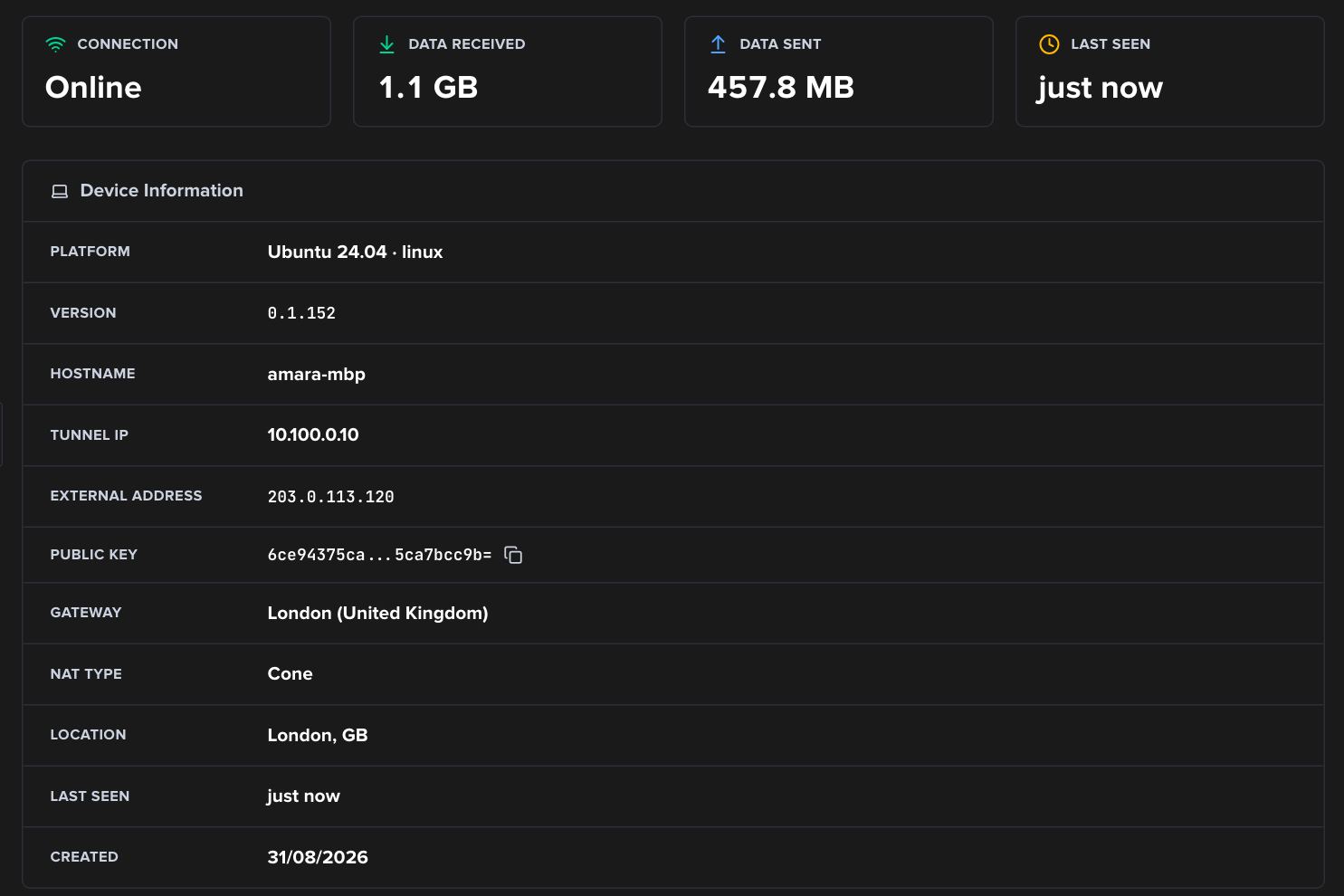
The device drawer shows the two halves of a peer: the tunnel IP control assigned and the public key the device generated. External address and NAT type come from STUN.
How a tunnel comes up#
- The agent registers and fetches its config over HTTPS. The config lists every gateway it may use as a peer: public key, endpoint, tunnel address, allowed IPs and keepalive.
- The agent creates
pha0, assigns its tunnel address and applies the peer set. Allowed IPs are replaced on every sync, so a route that no policy grants any more disappears on the next apply. - The gateway fetches its own config, which lists every device peer it should accept and the service routes each device is allowed. It applies the nftables ruleset first, then syncs peers.
- Both sides send WireGuard persistent keepalives. If control does not specify a value the agent uses 25 seconds. The gateway uses 25 seconds for every device peer.
The agent keeps the config fresh by listening on an event stream from control. A configuration change on the server triggers a fetch, as does a reload command in a heartbeat reply, a network change, or pulsectl refresh. The gateway listens on the same kind of stream and also refreshes every 60 seconds; an unchanged policy version is a no-op.
A gateway evicts a device peer whose last handshake is older than 5 minutes and flushes its conntrack entries. The next successful handshake re-adds it.
Which gateway carries a service#
Control sends the agent a ranked list of gateways per service. Ranking prefers gateways whose health probe for that service is healthy, then administrative priority, then CPU and memory load, then latency. The agent adds the service CIDR to exactly one gateway’s allowed IPs at a time, so a service published on three gateways still has one active path per device. The agent re-evaluates every second and can move the route when the active gateway degrades. You can force a move with pulsectl failover <gateway_id>.
NAT traversal#
Most devices sit behind NAT. Gateways often do too. PulseHA uses three mechanisms, in this order:
- STUN. Control sends the agent a list of STUN servers. The agent sends a STUN binding request (default port 3478, 5 second timeout) to learn its public address and reports it in heartbeats. It repeats this on every network change. Gateways do the same against their configured STUN server every 30 seconds.
- Hole punching. Each gateway publishes candidate addresses (
host,srflx,relay) in its heartbeat. The agent sends short UDP packets from the WireGuard socket to every candidate every 25 seconds and immediately after a network change. Gateways punch back toward device candidates. This opens the NAT mapping so the real handshake can follow. - Relay candidates. If the direct endpoint produces no handshake within 15 seconds, the agent rotates the peer endpoint through the gateway’s remaining candidates. Relay candidates come from TURN running on Orbit points of presence. The gateway holds the TURN allocation; the agent only needs to send to the relay address. If every candidate fails, the agent retries the cycle with a backoff from 30 seconds up to 5 minutes.
If a gateway’s public IP matches the agent’s STUN result and the gateway published a host candidate on one of the device’s local subnets, the agent uses that LAN address directly.
What is encrypted#
- Traffic between the agent and the gateway is encrypted by WireGuard, from
pha0on the device towg0on the gateway. - Agent-to-control and gateway-to-control calls are HTTPS. The gateway uses mutual TLS. The agent can pin control’s certificate (
pulsectl settings set --tls-pins). - Traffic from the gateway to the private application is not encrypted by PulseHA. It leaves
wg0, passes the nftables ruleset and is forwarded on the gateway’s LAN interface with source NAT. Use TLS on the application itself if you need encryption on that last hop. - Internet traffic through an exit node or Orbit is encrypted to the exit, then leaves as ordinary internet traffic.
What a tunnel does not prove#
An established handshake proves two things: the device holds a key control registered, and UDP reaches the gateway. It does not prove authorization. The gateway’s forward chain drops by default, and every allowed flow needs a per-device rule compiled from an access policy. A device with no granted routes still handshakes and still reaches the gateway’s DNS resolver. Access policy, device posture, firewall rules and the application itself can all still refuse a request.
Common mistakes#
- Hand-editing peers. Changes made with
wg seton a gateway are overwritten on the next sync. Change the service or policy in the console instead. - Blocking UDP 51820 inbound on the gateway host. The package postinstall does not open it. Hole punching can sometimes work around this, but do not rely on it.
- Treating “Online” as “working”. Presence is a heartbeat over HTTPS, not a WireGuard handshake. Check the handshake with
pulsectl gatewayson the device orsudo pulseha-gateway peerson the gateway, which lists every configured device and whether it handshook in the last five minutes. On a gateway older than 2.20.0, usesudo pulseha-gateway status --peers-only.