Application-aware access
Publish narrow, named destinations instead of broad networks.
A traditional VPN hands a device a route to a whole subnet and lets the application decide who gets in. PulseHA publishes each application as a named service, grants it with an access policy, and compiles that grant into a per-device route on the agent and a per-device rule on the gateway. This page explains how a service becomes something the agent can route to, how the gateway checks it, and how DNS names fit in.
A service is a destination, not a network#
A service has four parts: an address type, an address, a protocol and its ports.
| Address type | What you enter | What the device receives |
|---|---|---|
| IP / CIDR | An IP address such as 10.0.0.5, or a prefix such as 10.20.30.0/24 | A host route (/32 or /128) or that prefix as an allowed IP on one gateway |
| Gateway Host | One TCP port on the gateway itself | The serving gateway’s tunnel IP as a host route |
Hostname destinations are not supported. Gateways match traffic on IP addresses and none of them resolves names, so a new hostname service is rejected and an older one whose address is a DNS name shows Not enforced and grants nothing until it is converted to an IP address.
Protocol is TCP or UDP. Ports are a list or ranges, such as 22, 80, 443 or 8000-8100; empty means every port of the protocol. Gateway Host supports TCP only and takes exactly one port. For IP and CIDR services the protocol and ports are enforced by the gateway, not by the device route, so a /24 service on TCP 443 still gives the device a route to the whole /24 but the gateway only forwards port 443. Gateways older than 2.21.8 enforce only the lowest port of a list or range until they are updated.
Prefer the narrowest address that covers the application. A /32 for one server is better than the /24 it sits in: revoking the grant removes exactly one thing, the topology view shows exactly one thing, and audit decisions name exactly one thing.
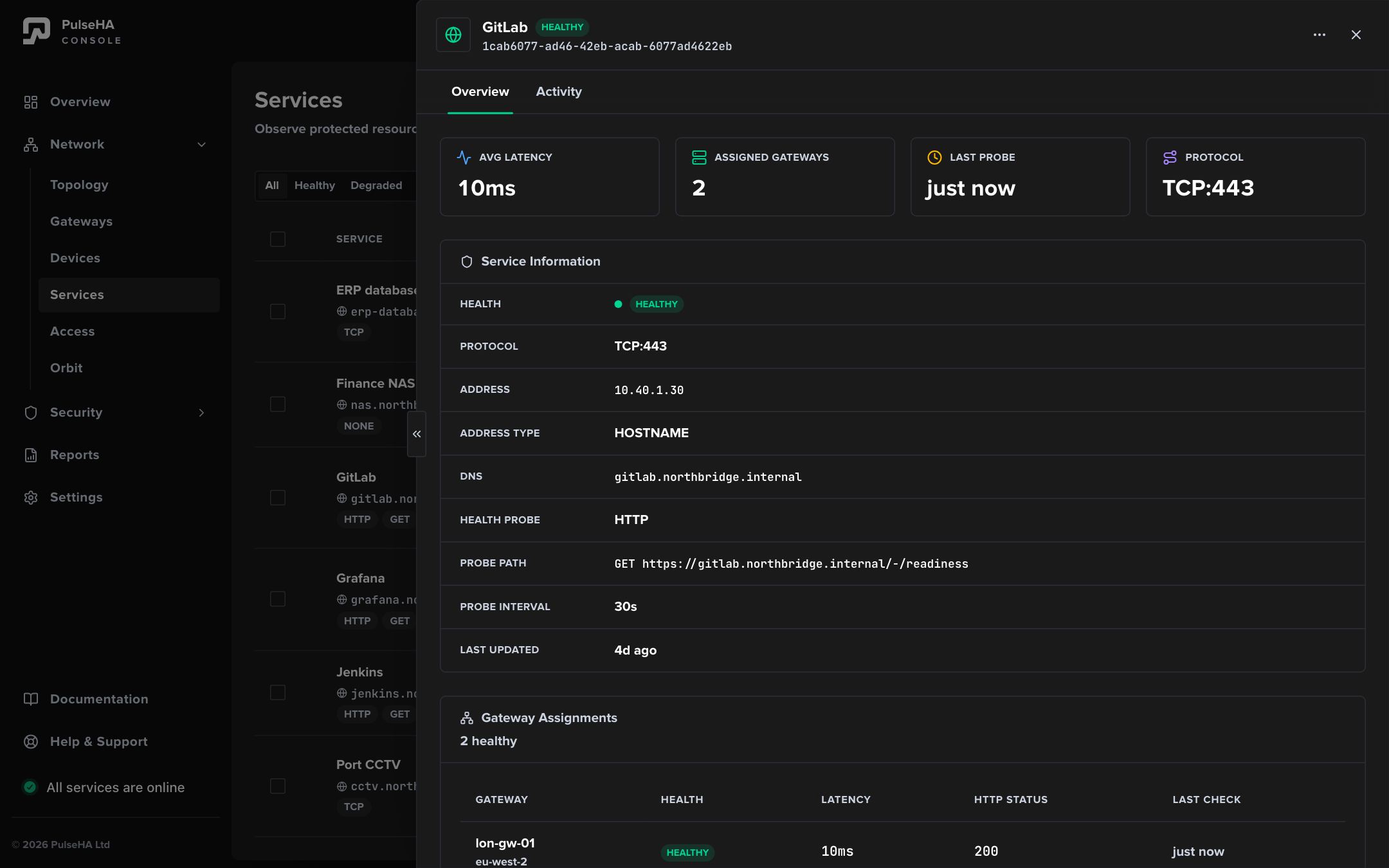
The service drawer for GitLab: its address, TCP 443, its DNS name, and the two gateways assigned to serve it.
How a grant becomes a route#
When you save an access policy, control recompiles the tenant’s configuration. For each device and each service the device is allowed, it produces one route carrying the policy ID, service ID, CIDR, protocol, port, effect and priority. Where two policies cover the same service for the same device, the lower priority number wins; on a tie Deny wins.
The agent receives two views of this:
- the allowed IPs for each gateway peer, which is what WireGuard uses to decide where a packet goes;
- a ranked list of gateways per service with health and load data.
The agent places each service CIDR on exactly one gateway at a time, the best-ranked healthy one, and re-evaluates every second. Every gateway peer also keeps its own tunnel address as an allowed IP, so DNS and probes still work on standby gateways.
The gateway receives the same routes from its side: for each device peer, an ordered list of rules keyed on the device’s tunnel IP as source and the service address, protocol and port as destination. These become nftables rules in the forward chain, which has a default policy of drop. A device not covered by any Allow ends with a rule that drops everything from its tunnel IP. Reply traffic is matched per rule with conntrack rather than by a blanket accept.
Gateway Host services are different. They do not pass the forward chain. A userspace proxy on the gateway listens on the tunnel IP at the service port and checks each connection against its own per-device allow list before relaying to the local port.
Naming the service#
Enable Settings → DNS and each service gets a DNS name under your suffix (default pulseha.internal, or a verified domain). You can set the name explicitly or let the console derive it from the service name. Control builds records only for the services a device is allowed, and delivers them two ways:
- The agent writes them into the OS hosts file inside a managed block. This works without any resolver.
- The gateway’s DNS resolver serves the whole tenant zone authoritatively, with a TTL of 60 seconds, and forwards everything else upstream.
The device’s OS resolver points at a loopback forwarder (127.0.0.1:53) that relays to the gateway resolver, so names resolve the same way from a browser, a terminal or a script. Gateway Host service names resolve to the serving gateway’s tunnel IP.
A DNS name is a convenience. Resolving a name proves nothing about access; the gateway rule still decides.
Publish an application#
- Enroll a gateway that can reach the application.
- Open Network → Services → Add Service. Give it a recognizable Service Name.
- Choose IP / CIDR and enter the narrowest IP address or CIDR that works. Set Protocol and only the Ports the application uses. An Application Type such as SSH or Web fills in the usual ones.
- Optionally configure a probe (Probe Type HTTP, TCP or UDP) so gateway ranking has health data.
- Under Gateway Assignment, pick the gateways that can actually reach the target. Leaving it empty means all gateways, which only works if every gateway has a route.
- Open Network → Access → Add Policy. Choose Allow, pick subjects deliberately (All subjects or a selected list), add the service, and set the gateway scope.
- Click Simulate to check the decision for a user, device, gateway and service before anyone relies on it.
- On a device, run
pulsectl refreshand thenpulsectl gatewaysto confirm the CIDR appears under a gateway.
What this means for you#
- You never hand out a subnet by accident. Every route on a device corresponds to a service in a policy that names that device, its user or its group.
- Removing a grant removes the route on the next publish and the gateway rule with it. There is no “the route is still cached” state; allowed IPs are replaced on every sync.
- Firewall rules and Secure Web filtering are separate layers. A firewall Allow does not create access, and a Secure Web policy only sees internet traffic. Neither replaces a service and a policy.
Common mistakes#
- Publishing the whole LAN as one service. It works, but every grant is now all-or-nothing and the audit trail cannot distinguish applications.
- Entering a DNS name or
host:portas the address. Neither is accepted. Use the server’s IP address, or a CIDR, and put the port in Ports. - Leaving Ports empty when the application uses one or two. Empty means every port of the protocol. List only what the application needs.
- Assigning a service to all gateways. A gateway with no route to the target still advertises it, and the agent may rank it first if nothing is probing health.
- Expecting a policy with no services to mean “all services”. It is skipped at compile time and grants nothing.